


Service businesses run on relationships, deadlines, and follow-through. When systems break down, all three suffer.
Growing UK firms with complex workflows (professional services, consultancies, agencies) are consolidating scattered spreadsheets, email threads, and tool sprawl into a single workspace. ClickUp 4.0 brings tasks, timelines, client communication via Chat, AI-powered Super Agents, and live reporting into one platform, replacing the patchwork most service businesses default to.
The results depend heavily on how the workspace is structured from day one. This guide covers the architecture, automation, and reporting decisions that determine whether ClickUp becomes a genuine operating system for your business or just another underused tool.
IT Visionists structures every implementation around the Efficiency Triangle: People and Adoption, Process and Workflow, Tools and Automation. Skipping any one of the three is usually why a ClickUp setup stalls. The sections below follow that same order.
Why Getting This Right Matters in 2026
Client expectations keep rising. Firms without clear workspace structure and reliable automation fall behind quickly, losing billable hours to admin work that should be handled by the system.
A well-built ClickUp workspace delivers:
- Faster client onboarding: templated kickoffs mean every engagement starts consistently, with nothing missed
- Fewer dropped handoffs: automations route work between teams without relying on someone remembering to reassign
- Real-time profitability visibility: Dashboards show budgeted vs actual hours per client, not a spreadsheet updated monthly
- Less manual admin: Super Agents and automations handle status updates, reminders, and routine reporting
- AI that actually knows your business: Brain2 pulls context from every task, doc, and conversation in your workspace to answer questions and generate updates
Firms that invest in this groundwork early see faster adoption, cleaner reporting, and a setup that scales as headcount and client numbers grow.
Building a Workspace That Matches How Your Firm Actually Works
ClickUp’s hierarchy (Workspace → Spaces → Folders → Lists → Tasks) is flexible, but that flexibility causes problems when firms don’t plan their structure upfront.
Here’s what works for service businesses:
Structuring Your Workspace for Client Work
The strongest results come from giving each client its own Space (or Folder within a Client Work Space, depending on client volume), with internal operations kept in separate Spaces entirely.
Recommended structure for most service firms:
- One Space per major client (or one “Client Work” Space with Folders per client if you have 20+ clients)
- Consistent Folder structure within each client: e.g., Onboarding, Active Projects, Recurring Work, Offboarding
- Separate Spaces for internal operations: Finance, HR, Marketing, Business Development
- Custom Fields set at Space level so they cascade down: Client Type, Engagement Value, Account Manager, Billable/Non-Billable
This structure means you can filter Dashboards by client, by engagement type, or by profitability without fighting the hierarchy. It also keeps permissions clean: client-facing guests see only their Space.
Why this matters for ClickUp specifically: Statuses, Custom Fields, and Automations inherit downward through the hierarchy. Set them at the right level once, and every new List beneath automatically gets them. Set them at the wrong level, and you’re reconfiguring for months.
Creating Repeatable Onboarding Processes
New client onboarding is the easiest win to secure early because it repeats with every engagement.
How to build this in ClickUp:
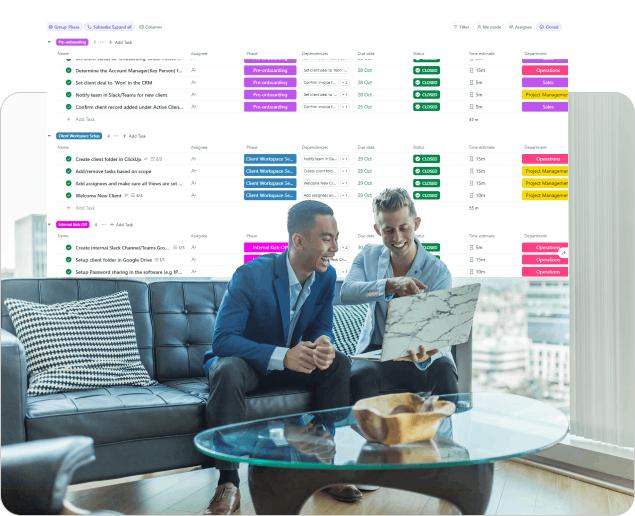
- Create a List Template containing every onboarding step: kickoff call, document collection, system access setup, first deliverable briefing, internal handover notes
- Use a Form (attached to your CRM or intake List) to capture new client details. When the Form is submitted, an Automation triggers the template to deploy
- Set relative due dates in the template (e.g., “3 days after task creation”) so the timeline auto-adjusts for each new client
- Use Dependencies to enforce sequence: the kickoff call must be marked complete before the first deliverable task unlocks
- Assign a Super Agent to monitor onboarding progress and flag any tasks that slip past their due date
The same templating logic extends to reporting cycles, quarterly reviews, and client offboarding.
Where Automation Actually Saves Time
Automation fails when firms try to automate everything at once. Start with these high-impact rules:
Status-based routing:
- When a task moves to “Ready for Review,” automatically reassign to the account manager and add a due date 2 days out
- When a task moves to “Complete,” notify the client via a linked Chat channel or email
Due date management:
- Automatically flag overdue tasks and notify the assignee + their manager
- Reschedule recurring check-in tasks when a client project timeline shifts
Task creation from triggers:
- New Form submission → create onboarding List from template
- Task marked “Blocked” → create a subtask assigned to the blocker’s owner with a 1-day due date
Super Agent automation (new in 2026):
- Deploy a Super Agent that monitors hours logged vs budgeted across all active client Spaces and posts a weekly summary to a Chat channel
- Use a Super Agent to draft client update emails based on completed tasks that week
Tracking Time, Budgets, and Profitability
ClickUp now supports triggering automations from external app events (new in 2026), so you can fire workflows from CRM updates, payment confirmations, or support tickets without Zapier.
Native time tracking is built into every task. Pair it with Custom Fields for budgeted hours and hourly rate, and you get profitability visibility without a separate tool.
Setup that works:
- Custom Fields on each client Space: Budgeted Hours (number), Hourly Rate (currency), Engagement Type (dropdown)
- Rollup Fields (or Formula Fields): calculate total logged time vs budget at Folder and Space level
- Dashboard with these cards:
- Time Tracked by Space (shows hours per client)
- Custom Field totals: Budget Remaining per client
- Overdue tasks by client (early warning on scope creep)
- Workload view: who’s overallocated this week
Firms with this visibility catch budget overruns weeks earlier than those relying on manual monthly check-ins. Brain2 can also surface insights like “Client X has burned 80% of budgeted hours with 3 deliverables still open” directly in Chat or via a Super Agent alert.
Communication Without Leaving ClickUp
One of the biggest shifts in ClickUp 4.0 is Chat replacing the need for Slack or Teams for internal and even client communication:
- Channel per client Space: keeps discussions tied to the work, searchable, and visible to Brain2
- Posts for important announcements (retainer renewals, scope changes) that need to stand out from conversation
- AI Notetaker on client calls: automatically captures action items and creates tasks from them
- @mentions in task comments for quick decisions that stay attached to the work
This means your client communication history lives alongside the tasks it relates to, so nothing gets lost in a separate chat tool.
Why Many Firms Bring in a Specialist
Building all of this internally typically means several rounds of trial and error, three to six months of iteration, and a period where the team loses confidence in the system because it was set up wrong the first time.
A Certified ClickUp Consultant shortens that curve by:
- Mapping your real workflows before creating any structure (not applying a generic template)
- Setting Custom Fields, statuses, and automations at the correct hierarchy level from day one
- Building Dashboards that answer the questions leadership actually asks
- Training the team on their specific workflows, not generic ClickUp tutorials
- Configuring Super Agents that match your operational rhythm
The difference isn’t whether you can do it yourself. It’s whether you want the system working properly in 2 weeks or 6 months.
Why UK Service Firms Work With IT Visionists
IT Visionists is a Certified ClickUp Consultant that builds workspaces for consulting firms, agencies, and service businesses across the UK. Every engagement starts with the Efficiency Triangle:
- People and Adoption: Who uses the system, what’s their skill level, what resistance exists? Training and change management come first, not last.
- Process and Workflow: How does client work actually flow through the business? Map it before building it.
- Tools and Automation: Only after people and process are clear do we configure Spaces, automations, Super Agents, and Dashboards.
Results from real implementations:
- 200+ ClickUp implementations for UK and US service businesses
- 168,000+ automations running annually across client systems
- BDSIP (education services): moved from 60% to 90% form completion rate, freeing 40+ hours of staff time per week
- Average time-to-adoption: 2-3 weeks with consultant-led setup vs 3-6 months self-serve
What Happens After Launch
Getting the platform live is step one. A properly built ClickUp workspace pays off well beyond launch, but only if:
- Automations are reviewed quarterly as processes evolve
- New Super Agents are added as you identify repeating admin patterns
- Dashboards are refined as leadership learns what questions to ask
- Templates are updated when your service delivery improves
IT Visionists offers ongoing optimisation retainers for firms that want their workspace to evolve with the business, not calcify after launch.
Ready to talk through where your setup stands? Book a free, no-pitch discovery call at itvisionists.com.
Frequently Asked Questions
How long does a full ClickUp setup take for a service business?
Most firms reach a functional, team-adopted setup within two to four weeks when working with a consultant. Self-serve implementations typically take three to six months to reach the same level of adoption and reporting maturity. The timeline depends on client volume, number of service lines, and how many existing processes need mapping.
Can automation and Super Agents replace a project manager?
No. Automation removes repetitive admin (status updates, reminders, task routing, reporting). Super Agents can monitor budgets, draft updates, and flag risks. But client relationships, prioritisation judgements, and scope decisions still need a human. The goal is to give your project managers back 5-10 hours a week, not eliminate them.
Is ClickUp suitable for small consulting firms or only larger teams?
Small firms (3-15 people) often benefit most. A proper setup prevents the disorganisation that becomes exponentially harder to fix as client numbers grow. ClickUp’s pricing works at every scale: the Business plan at £10/user/month gives you everything most service firms need including automations, time tracking, Dashboards, and Custom Fields.
What’s different about ClickUp in 2026 compared to previous years?
ClickUp 4.0 (launched late 2025) was a complete platform overhaul. Brain2 (June 2026) rebuilt the AI layer with multi-model routing. Super Agents let you create no-code AI teammates that monitor work, draft communications, and trigger actions. Chat replaced the need for external messaging tools. The platform in 2026 is materially different from what most guides still describe. More detailed comparison is provided in our guide: ClickUp 4.0 – What’s New.
Do we need to migrate from our current tools?
ClickUp has native import from Asana, Monday, Trello, Jira, and CSV. For more complex migrations (preserving time logs, custom field data, or automation logic), a consultant-led migration avoids data loss and reduces the “two systems running in parallel” period to days rather than weeks.