


Choosing the right ClickUp pricing plan can transform your productivity, collaboration, and budget. Whether you’re a freelancer, agency, start-up, or enterprise, ClickUp offers plans tailored to every need. This guide breaks down each plan, highlights key benefits, answers common questions, and provides practical tools to help you make the best choice.
Disclaimer: Always check the official ClickUp pricing page for the latest updates.
ClickUp Pricing Plans Comparison (2026)
ClickUp prices at a glance
| Plan | Price, billed yearly | AI credits a month | Best for |
|---|---|---|---|
| Free Forever | $0 | 500 per workspace | Personal use and testing |
| Core (formerly Unlimited) | $9 per user a month reg. $12 | 1,000 per user | Small teams |
| Business | $17 per user a month reg. $25 | 1,500 per user | Growing teams with complex workflows |
| Enterprise | Quote from sales | 3,000 per user | Large organisations needing advanced security |
| Max | $100 per user a month reg. $120 | 10,000 per user | AI-first teams |
AI is now included on every plan as a monthly allowance of AI credits, rather than a separate Brain add-on. Prices are in US dollars, per user per month on yearly billing, and exclude local taxes. The yearly prices shown are an introductory rate; the regular price is listed underneath. Monthly billing costs more.
Already on ClickUp? Workspaces on the old Unlimited ($7) or Business ($12) plans keep that pricing until renewal, and no earlier than January 2027, so check your own plan before comparing.
Which plan do most teams need? For most growing service businesses, Business is the right choice: it adds the dashboards, workload view, automations and permissions that client work depends on. Not sure? See how we set up ClickUp for growing teams, or book a free call and we will tell you which plan fits.
Full feature comparison
Below is a visual comparison table for a quick overview of features and limits across all plans:
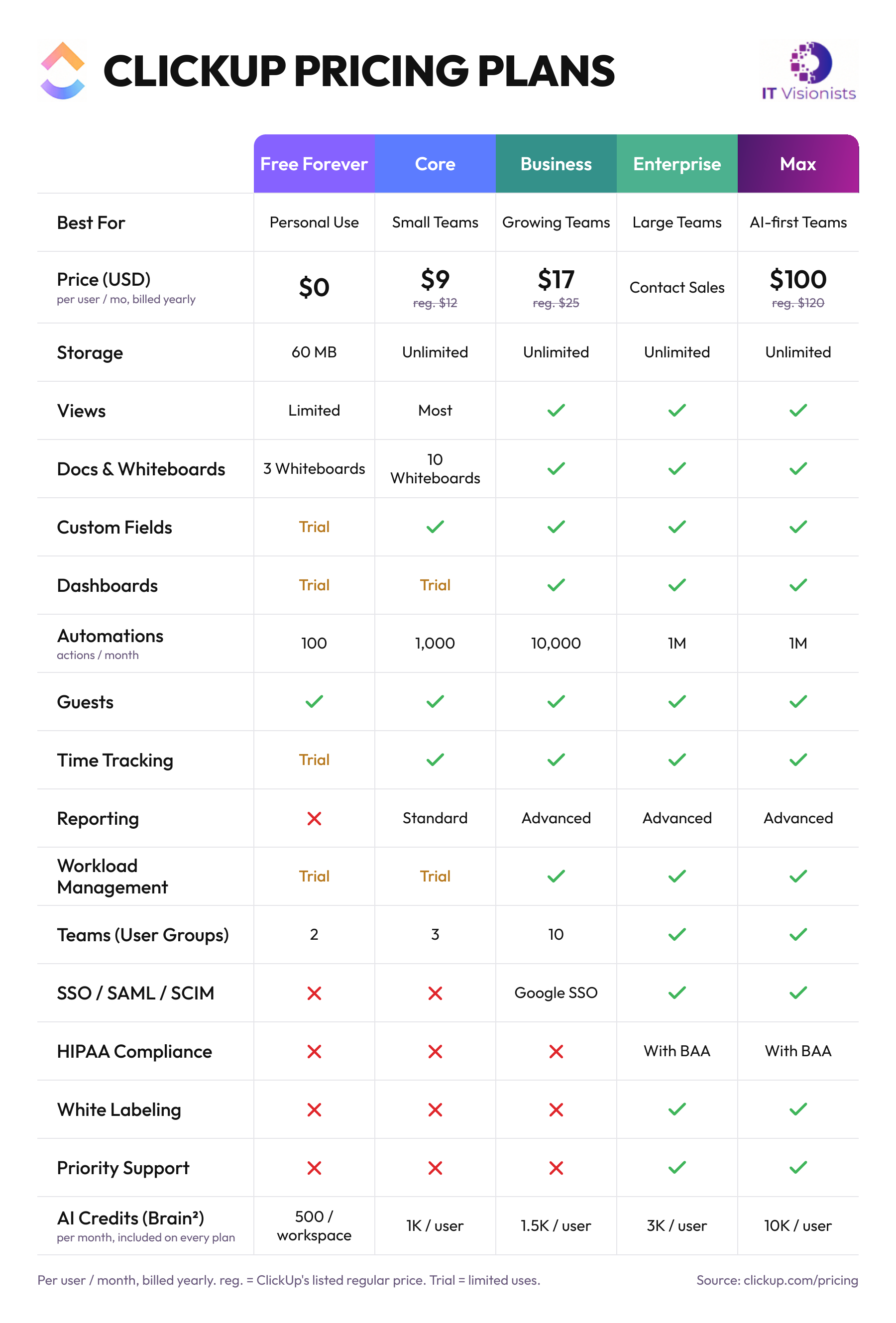
*Enterprise automation and API limits are negotiable and can be increased as needed.
Key Benefits by Plan
Free Forever Plan
- Zero cost to get started—ideal for testing ClickUp’s core features.
- Unlimited users and tasks for simple collaboration.
- Essential project management tools (tasks, basic views, Docs, Whiteboards).
- 500 AI credits per workspace and 100 automation actions a month; custom fields, dashboards and time tracking are trial only.
Example Use Case:
A freelancer or student tracking personal projects and experimenting with ClickUp before scaling up.
Core Plan (formerly Unlimited)
- Unlimited storage and integrations—no file or connection limits.
- Guest access with permission controls for easy client collaboration.
- Native time tracking for accurate billing.
- Affordable entry point for small teams to unlock advanced views and custom fields.
Example Use Case:
A small agency managing client deliverables, collaborating with external partners, and automating basic workflows.
Business Plan
- Up to 10 teams (user groups) for advanced permission management.
- Advanced reporting and workload management for data-driven decisions.
- 10,000 automation actions a month.
- Google SSO for secure, streamlined access.
- Granular guest permissions and advanced sharing.
Example Use Case:
A mid-sized company with multiple departments needing robust reporting, automation, and access control.
Enterprise Plan
- Custom roles, advanced permissions, and white labeling for complete control and branded experiences.
- SSO with SAML/OAuth, SCIM provisioning, and HIPAA compliance for enterprise-grade security.
- Dedicated customer success manager and priority support for personalized onboarding and fast resolution.
- Negotiable automation and API limits for large, complex organizations.
- Advanced audit logs and data controls for governance.
Example Use Case:
A large, regulated organization requiring strict compliance, custom branding, and premium support.
Max Plan
- Everything in Enterprise-level security, including SAML SSO, SCIM, HIPAA with a signed BAA and white labelling.
- 10,000 AI credits per user a month for teams running AI agents across their work.
- 1 million automation actions a month and priority support.
Example Use Case:
A team that relies heavily on ClickUp AI and agents for daily delivery and needs far more AI capacity than Enterprise includes.
Feature Limitations & Details
- Free Forever is limited to 3 Whiteboards and Core to 10; Business and above are unlimited.
- Trial only on Free Forever and Core; included from Business upwards.
- Free Forever 100 actions a month, Core 1,000, Business 10,000, Enterprise and Max 1 million.
- Guests are included on every plan, including Free Forever, with more permission control on paid plans.
- Integrations: Most popular integrations (Slack, Google Drive, Teams, GitHub, HubSpot, etc.) are available on Core and above. Some advanced controls are Enterprise-only.