


In today’s rapidly evolving business landscape, automation is more than a competitive edge, it’s a necessity for scaling operations, improving efficiency, and staying ahead. Whether you’re a start-up, SME, or enterprise, choosing the right automation platform can transform your business. Two of the most prominent automation platforms, Zapier and Make.com (formerly Integromat), have continued to innovate in 2026, each offering unique strengths for businesses of all sizes. But which is right for your growth journey?
Platform Overviews (At-a-Glance)
Zapier
Best for: Simplicity, speed, and broad integrations
Zapier is renowned for its user-friendly interface and massive integration library, now boasting over 8,000 app connections. Its recent introduction of AI-powered workflows and agentic automation enables businesses to orchestrate complex processes with minimal setup, making it ideal for teams seeking fast, reliable automation without deep technical expertise.
Make.com
Best for: Custom, complex, and highly visual workflows
Make.com stands out for its powerful visual editor and modular workflow design. With around 2,500 integrations and a focus on detailed customization, Make.com is a favorite among businesses that require advanced, multi-step automations and granular control over their processes.
Key Features & Updates
Real-World Business Use Cases
Zapier:
- Small Businesses: Automate posting new blog articles to social media, sync leads from web forms to CRMs, or trigger notifications for new sales, all with minimal setup.
- Enterprises: Leverage AI-powered workflows to automate multi-app processes, such as onboarding new employees across HR, IT, and payroll systems.
- E-commerce: Streamline order processing, inventory updates, and customer notifications across multiple platforms.
Make.com:
- Software & SaaS Companies: Automate bug tracking, project management, and client onboarding with intricate, multi-step workflows.
- Businesses with Complex Operations: Use Make.com’s visual builder to create detailed automations like routing support tickets based on keywords, updating multiple systems, and handling exceptions with advanced logic.
- Agencies: Manage multi-client reporting, approvals, and campaign tracking with custom, modular automations.
Decision Criteria: Which Platform Should You Choose?
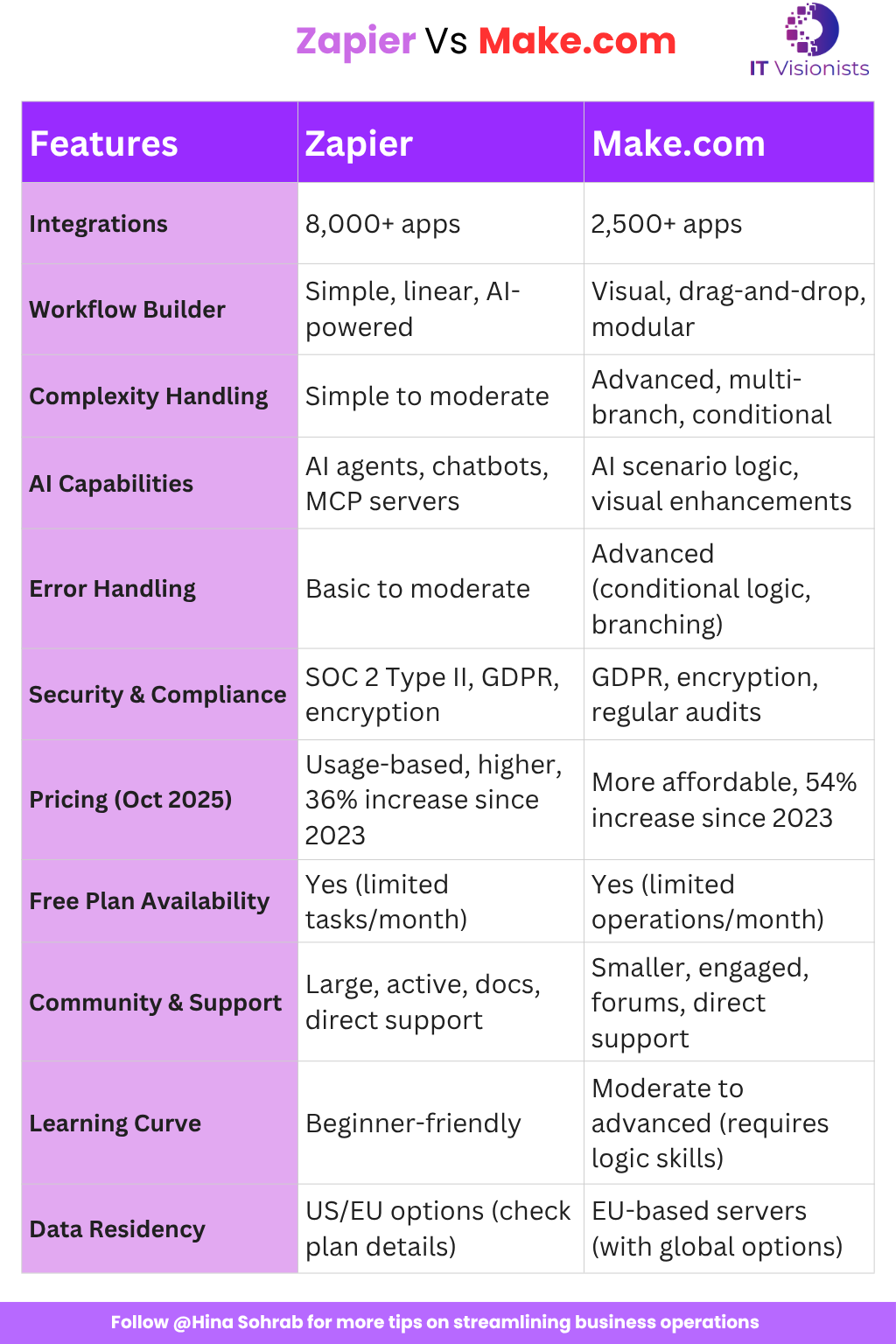
Quick Checklist:
- What is the complexity of your workflows?
- Do you need advanced logic and branching?
- How many apps do you need to integrate?
- What is your budget for automation tools?
- What level of support and community engagement do you require?
- Are security certifications and compliance a priority?
Transition Tips
Switching platforms? Here’s a step-by-step migration plan:
- Audit Current Automations: List all workflows and integrations in use.
- Export Data: Download data and documentation from your current platform.
- Map Integrations: Identify equivalent integrations and features on the new platform.
- Recreate Automations: Manually rebuild workflows as needed.
- Test Thoroughly: Run tests to ensure all automations work as expected.
- Go Live: Decommission the old setup only after confirming stability.