

What Are ClickUp AI Agents?
AI Agents are autonomous, context-aware assistants that adapt to your workspace, make decisions, and handle complex workflows without manual input. They proactively surface information, answer questions, and take action.
AI Agents in Action:
- Evaluate job applications and summarize candidate fit
- Provide real-time status updates by analyzing team progress
- Summarize documentation during sprint planning
- Onboard new team members by answering questions and guiding them
- Review content for brand voice and consistency
How to Use AI Agents Effectively:
- Start with Prebuilt Agents for common workflows
- Build Custom Agents for unique processes
- Configure triggers, conditions, and knowledge sources to tailor behaviour
- Use Agents in chat channels to answer questions or provide updates
For more advanced examples, explore these practical ClickUp AI Agent workflows used by solopreneurs and growing businesses.
Example Scenarios for Professional Services Businesses:
- Client onboarding: An Agent welcomes new clients in chat, answers FAQs, collects missing info, and creates follow-up tasks.
- PMO reporting: An Agent compiles a weekly status by reading progress, time, blockers, and budget, then posts a summary and updates a Doc.
- Resource planning: When new work arrives, an Agent checks team availability, proposes assignments, flags conflicts, and drafts a plan.
- QA reviewer: Before client review, an Agent checks deliverables against guidelines and requests missing items.
- Renewal nudges: Before contract end, an Agent reviews health signals, drafts renewal emails, and alerts the account lead.
AI Agents are ideal for complex workflows that need contextual decision-making and autonomy. They’re proactive, workspace-integrated, and reduce manual effort.
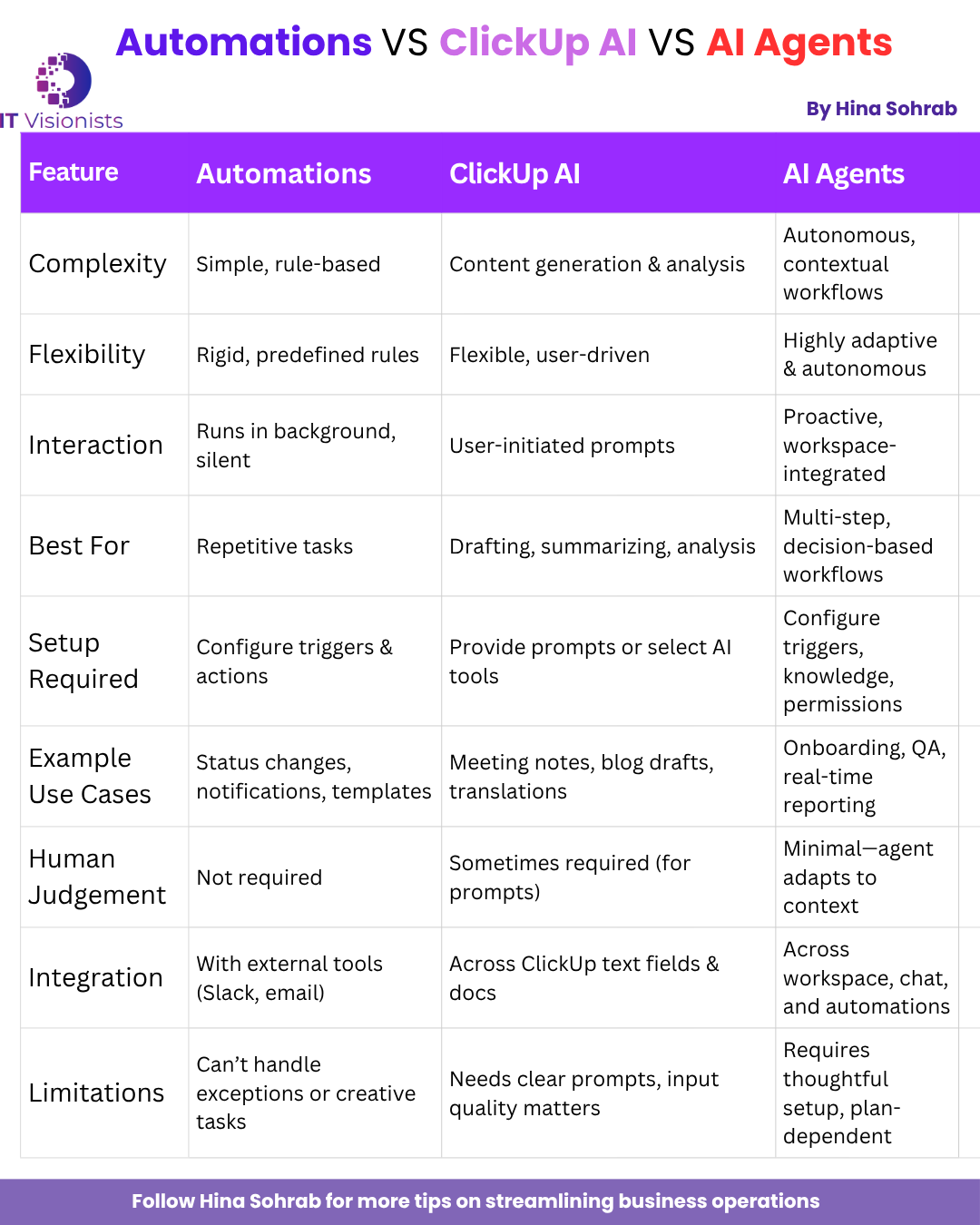
Key Differences at a Glance
- Complexity:
- Automations: Simple, rule-based
- ClickUp AI: Content generation and analysis
- AI Agents: Autonomous, contextual workflows
- Flexibility:
- Automations: Rigid, predefined
- ClickUp AI: Flexible, user-driven
- AI Agents: Highly adaptive
- Interaction:
- Automations: Silent, background
- ClickUp AI: User-initiated
- AI Agents: Proactive, integrated
- Best for:
- Automations: Repetitive tasks
- ClickUp AI: Drafting, summarizing, analysis
- AI Agents: Multi-step, decision-based workflows
Which Should You Use?
- Automations: For straightforward, repetitive tasks (status changes, notifications, templates)
- ClickUp AI: For drafting, summarizing, translating, or analyzing content (meeting notes, proposals, status updates)
- AI Agents: For advanced, multi-step workflows that need contextual awareness and autonomy (onboarding, QA, reporting)
Pro tip: Combine these features. For example, use an Automation to trigger an Agent after “Contract Signed,” then have the Agent generate onboarding tasks and a client comms plan with AI-polished templates.
Limitations and Considerations
- Automations are limited to predefined rules and can’t handle exceptions or creative tasks
- ClickUp AI relies on clear prompts and high-quality inputs.
- AI Agents need thoughtful configuration to avoid noisy or risky actions
- Feature availability may vary by ClickUp plan, permissions, and user role
ClickUp’s Automations, AI, and AI Agents each bring unique strengths. By understanding their differences and layering them thoughtfully, you can eliminate busywork, accelerate delivery, and focus your team on high-value outcomes.
Ready to grab the full potential of ClickUp for your business?
Contact IT Visionists to discover how we can implement the right mix of automation and AI for your workflows. Or, schedule a call to get started today.
Frequently Asked Questions
Q1: What is the difference between ClickUp Automations and ClickUp AI?
A: ClickUp Automations handle rule-based, repetitive tasks automatically, while ClickUp AI uses artificial intelligence to draft, summarize, and analyse content, helping with creative and analytical work.
Q2: When should I use ClickUp AI Agents instead of Automations or AI?
A: Use AI Agents for complex, multi-step workflows that require contextual decision-making and autonomy, such as onboarding, compliance checks, or real-time reporting.
Q3: Can I combine Automations, AI and AI Agents in ClickUp?
A: Yes! For example, you can set an Automation to trigger an AI Agent, which then uses ClickUp AI to generate onboarding tasks or client communications.
Q4: Are these features available on all ClickUp plans?
A: Feature availability may vary by ClickUp plan and user permissions. Check ClickUp’s official documentation or contact your workspace admin for details.
Q5: How can these features help my business?
A: By automating routine work, generating insights, and handling complex processes, these tools free up your team to focus on high-value client outcomes and strategic growth.